
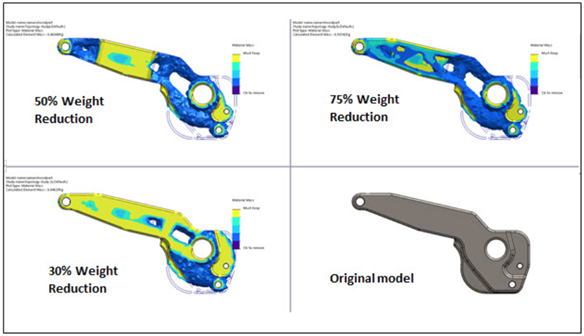
Introduction: We use Optimization studies for getting best results with reduced dimensions or mass. Optimization studies are of two types; one is topology optimization where the tool suggests the places to remove the mass while maintaining good stiffness. Second is Design Optimization study where the dimensions of the design are manipulated to find best design configuration for the given design conditions.
Benefits of Optimization Studies SOLIDWORKS Simulation
✔ Reduces design time
✔ Improves product performance
✔ Minimizes material usage
✔ Enhances innovation with automated exploration
What is Topology Study in SOLIDWORKS Simulation?
Topology Study is a shape optimization tool that automatically generates the most efficient shape of a component by:
- Removing unnecessary material
- Maintaining required strength/stiffness
- Achieving minimum mass or best stiffness-to-weight ratio
The goal of the topology study can either be to minimize the mass or displacement of your part, or to maximize its stiffness (best stiffness-to-weight ratio). It’s a good practice to start with the best stiffness-to-weight ratio (Maximize stiffness) option
What is Design Optimization Study in SOLIDWORKS Simulation?
Design Optimization Study is an optimization tool that tells the most efficient dimension of a component by:
- Considering the Design Variables
- Applying the Constraints and
- Attaining the Objective Function
The goal of a Design Optimization Study is to find the best possible design configuration by adjusting variables while satisfying all constraints.
Key Components of Optimization in SOLIDWORKS Simulation
1. Design Variables
These are parameters you allow the software to change. Examples include:
- Thickness of a plate
- Diameter of a shaft
- Length of a beam
You define upper and lower limits, and the solver explores within that range.
2. Constraints
Constraints ensure your design remains feasible and safe. Common constraints:
- Maximum stress limit
- Maximum displacement
- Factor of safety threshold
For example, stress must always stay below the material’s yield strength.
3. Goal (Objective Function)
This is what you want to achieve. Typical goals:
- Minimize mass
- Minimize stress
- Maximize stiffness
The software evaluates each design iteration based on this objective.
Conclusion By automating iterative testing, engineers can quickly arrive at the most efficient and robust designs. Whether reducing weight in automotive components or improving structural performance, optimization is an essential tool in today’s engineering workflow.
🔹 Follow us on LinkedIn for professional updates: Click Here
🔹 Like our Facebook page for news & events: Click Here
🔹 Watch tutorials and product videos on YouTube: Click Here
🔹 Explore SOLIDWORKS pricing, licensing, and exclusive offers: Click Here
🔹 Contact our experts for a quick demo or consultation: Click Here